Your internet connection might be fast, but that doesn’t always mean you’ll have a strong WiFi signal in every room. If your connection drops in the bedroom, struggles in the basement, or slows down when you move farther away from your router, your home may benefit from whole-home WiFi.
Whole-home WiFi is designed to provide more consistent wireless coverage throughout your house, helping your phones, computers, smart TVs, gaming consoles, and other connected devices stay online wherever you use them.
But how does it work, and is it something your home needs? Let’s break down what whole-home WiFi is, how mesh technology improves coverage, and how you can get more out of your home internet connection.
What Is Whole-Home WiFi?
Whole-home WiFi is a wireless networking solution designed to provide reliable WiFi coverage throughout your entire home rather than relying on a single router to reach every room.
Traditional routers broadcast a wireless signal from one central location. Depending on your home’s size, layout, building materials, and the distance between your devices and router, that signal may become weaker as you move farther away.
Whole-home WiFi uses mesh technology to extend wireless coverage. Instead of relying on one router, a mesh WiFi system uses multiple connected devices that work together to distribute your WiFi signal throughout your home.
This can help reduce dead zones, improve connectivity in hard-to-reach areas, and make it easier to stay connected as you move from room to room.
How Does Mesh WiFi Work?
Mesh WiFi systems use multiple devices, often called nodes or access points, to create one connected wireless network.
One device connects to your internet equipment and acts as the main gateway. Additional devices can be placed throughout your home to extend coverage into areas where your original router’s signal may struggle to reach.
Unlike traditional WiFi extenders, which often create separate network names or simply repeat an existing signal, mesh systems are designed to work together as one network.
Here’s how it works:
- Connect the main device: One mesh unit connects to your modem or internet gateway.
- Place additional devices: Additional mesh units are positioned throughout your home to extend wireless coverage.
- Create one connected network: The devices work together to provide WiFi coverage across multiple rooms and floors.
- Stay connected as you move: Your devices can transition between mesh units as you move throughout your home.
The result is a more consistent WiFi experience without needing to manually switch between different wireless networks.
Whole-Home WiFi vs. Traditional WiFi: What’s the Difference?
The biggest difference between traditional WiFi and whole-home WiFi is how wireless coverage is distributed.
A traditional router broadcasts a signal from one location. A mesh WiFi system uses multiple connected devices to extend that coverage.
| Feature | Traditional WiFi Router | Whole-Home Mesh WiFi |
| Coverage | Primarily one location | Multiple areas throughout the home |
| Dead zones | May occur farther from the router | Designed to help reduce dead zones |
| Network | One central access point | Multiple connected access points |
| Larger homes | May require additional equipment | Additional mesh units can extend coverage |
| Device management | Depends on router | Often includes a dedicated management app |
Neither setup is automatically better for every household. A traditional router may provide plenty of coverage in a smaller home, while larger homes or homes with challenging layouts may benefit from a mesh system.
What is eero Whole-Home WiFi?
eero is a mesh WiFi system designed to make managing your home wireless network easier.
Rather than relying on a single router, eero devices work together to distribute WiFi coverage throughout your home. Its TrueMesh technology helps manage how data travels across the network, adapting to network conditions and helping devices maintain a connection.
Through Zito Media, customers can access managed whole-home WiFi powered by eero.
Depending on your home’s needs and eligibility, available equipment options include:
- eero 7: A WiFi 7 mesh system with support for internet plans up to 2.5 Gbps and up to 2,000 square feet of coverage per unit under ideal conditions.
- eero 6+: A WiFi 6 mesh system with support for internet plans up to 1 Gbps and up to 1,500 square feet of coverage per unit under ideal conditions.
Actual wireless coverage and speeds vary depending on your home, placement, interference, and connected devices.
What Can You Do With the eero App?
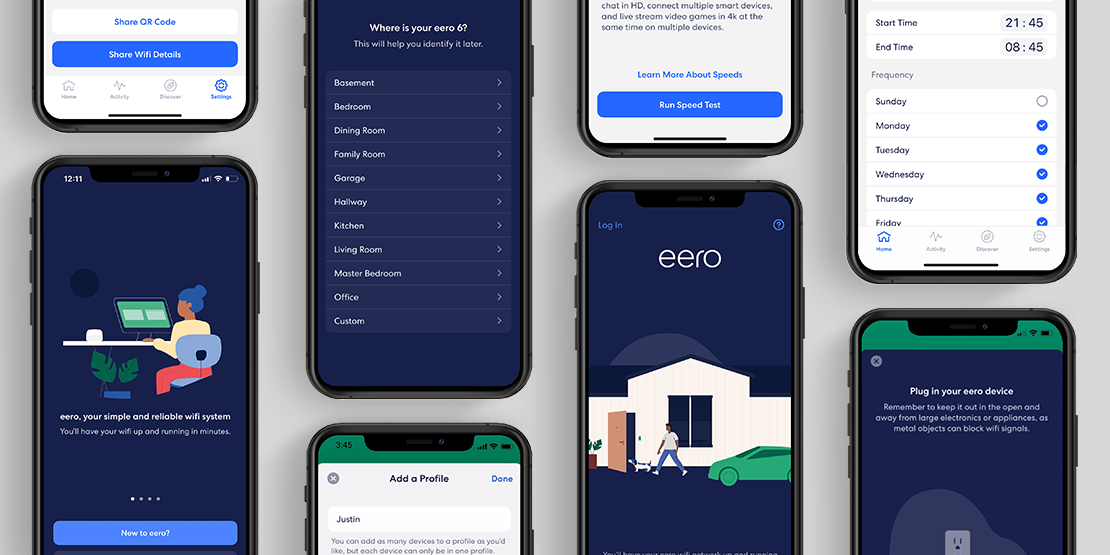
One of the convenient features of eero is its companion app, which allows you to manage your home WiFi network from your phone.
Depending on your equipment and app features, you can:
- View devices connected to your network.
- Run internet speed tests.
- Check your network’s health.
- Create profiles for family members.
- Set schedules and pause internet access for selected devices.
- Manage your guest WiFi network.
You don’t have to be a networking expert to get started. The app makes it easier to see what’s happening on your network and manage your connected devices.
Want to learn more? Explore Zito Media’s Whole-Home WiFi with eero to see available equipment, features, and ways to add eero to your internet service.
Get Better WiFi Coverage Throughout Your Home with Zito Media
A strong internet connection should be useful wherever you need it. If you’re tired of dealing with WiFi dead zones or inconsistent coverage, whole-home WiFi may be the solution.
Zito Media offers managed whole-home WiFi powered by eero, with equipment options designed to help extend wireless coverage throughout your home.
Whether you’re looking to improve your existing setup or bundle whole-home WiFi with a new internet plan, we’re here to help.
Ready to learn more? Visit our Whole-Home WiFi page to explore eero features and equipment options.
You can also check your address to see which Zito Media internet services are available in your area.