

Do you love watching movies and TV? Are you a mega fan that can never miss a show? Are you terribly busy and find it hard to watch your favs when they air? The struggle is real, we get it! So to help out, check out this list of the best streaming devices to watch TV your way, on your time. Most of these devices have a long list of apps, including Netflix, Hulu, and other favorites. But each has it’s own perks and exclusives, so choose wisely.
Roku 3
 The third incarnation of Roku’s flagship streamer is the most comprehensive to date, sporting more than 2,000 channels, an intuitive cross-platform search utility, and an excellent user interface. The puck-sized device is attractive and subtle, and equipped with nonskid rubber and enough weight to prevent it from getting shuffled around in your entertainment center. The remote is simple, but allows snappy navigation of Roku’s extremely intuitive channel-based interface, and best of all, features a built-in headphone jack for wireless listening when turning up the TV volume is a no-go. Wi-Fi is built in, but an Ethernet port is available if a faster connection is needed. A microSD slot for additional app and game storage is a feature unique to the Roku. The Roku 3 retails for $100 and can be purchased at Amazon, Walmart, and major electronic retailers. Learn More
Apple TV
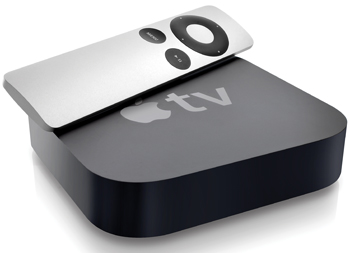 The Apple TV is getting a little grey — But there is light at the end of the tunnel. Apple has announced a new model (coming soon) that boasts the best user experience, including the Siri remote. The current Apple TV still remains one of the best offerings on our list— especially if you’re already heavily-invested in any of Apples other devices or services. While most essential services are supported, it is Apple Airplay and apps like iOS Remote that makes the Apple TV’s user experience unique. You can easily beam any content you’ve previously purchased or rented through the iTunes Store to your TV straight from the cloud, freeing your iPhone, iPod Touch, or iPad up to do other things. Sharing personal photos and videos from iOS devices is easiest with the Apple TV. It may be a little old, but the Apple TV is still going strong. The Apple TV retails for $70 (future model est. $149) and can be purchased at Amazon, Apple Store, Walmart, and Major electronic retailers. Learn More
Amazon Fire TV
 Amazon’s first go at a streaming set-top box instantly became a hit among members of the company’s Prime service, which delivers tons of free streaming movies and TV shows and a handy voice-search feature to get at them more easily. But the super-slim and speedy box will appeal to anyone with subscriptions to other services like Netflix and Hulu. Amazon also made the device compatible with a dedicated video game controller (sold separately at $40), which is designed to work with a wide array of mobile games such as Minecraft and Grand Theft Auto III. As the devices on this list go, the Fire TV is the most versatile and well-supported, it even plays 4k video content. To get the most out of this device it is best to have a Prime membership. The Amazon Fire TV retails for $100 and can be purchased at Amazon and Walmart. Learn More
Google Nexus
 After canning its first attempt at a streaming media player, Google returned to the set-top box field in the fall of 2014 with the Asus-made Nexus Player. It offers similar capabilities to Amazon’s Fire TV, allowing for voice-activated searching and personalized recommendations, along with integrated gaming if you decide to opt for an optional gaming controller. The Android-powered and Google-backed device has been slowly but surely adding apps, and Chromecast-style “casting” ability makes it easy for friends and family to share content from their smartphones and tablets. The only downside is no Ethernet port, which seems like an odd omission for a set-top box. Still, for the Google (Andriod) lover this is a no brainer. The Google Nexus retails for $170 and can be purchased at Amazon, Asus, Walmart, and Major electronic retailers. Learn More
Consoles (Xbox One, PS4, WiiU)
 Did you know that game consoles do a lot more than just play games these days. Video game consoles rank as the most popular devices for streaming content to your TV. The systems have quickly become a jack-of-all-trades media centers, conveniently giving you access to scores of programming from the likes of HBO Go, NFL Network, Netflix, and Hulu. Several other devices on our list provide gaming, but as you might expect, the next-gen consoles blow all mobile games out of the water in terms of graphics resolution and playability. The downside? These are much more expensive option with the Xbox One retailing for $349, PS4 for $399, and the WiiU for $299. Consoles can be purchased at Amazon, Walmart, and Major electronic retailers.


